Quick Answer & Cost Summary
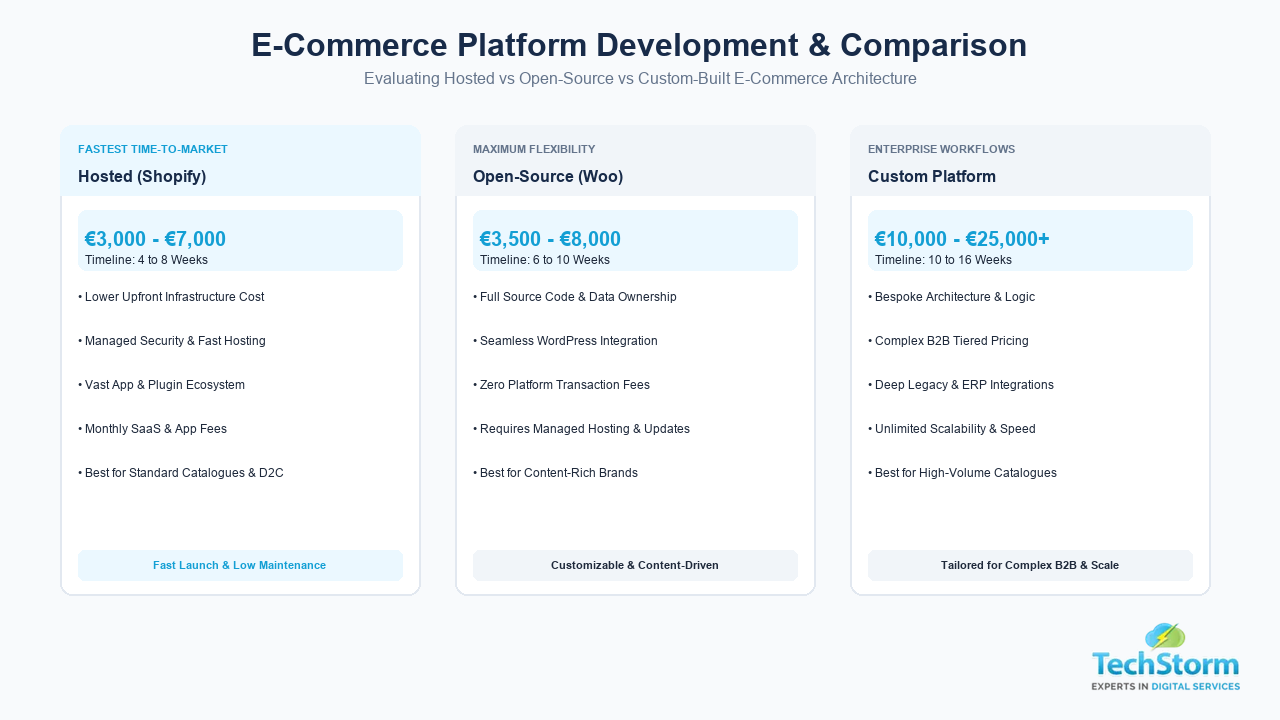
- Standard platform setup (Shopify or WooCommerce): 3,000 to 7,000 euro, 4 to 8 weeks.
- Custom e-commerce platform development: 10,000 to 25,000+ euro, 10 to 16 weeks.
- Store optimization for an existing site: 1,500 to 4,000 euro, 2 to 4 weeks.
- Integration services (payments, accounting, inventory, CRM): typically add 500 to 3,000 euro per integration, depending on complexity.
- Multi-channel selling needs inventory and order sync built in from the start, or stock and pricing will drift out of alignment between channels within weeks.
E-commerce platform development is the process of building or configuring the software that runs an online store, including the product catalogue, checkout, payment processing, and the connections to other tools a business relies on, such as accounting software, marketing platforms, and sales channels like Amazon or Instagram. Most Irish and UK businesses choose between a hosted platform such as Shopify, an open-source platform such as WooCommerce, or a fully custom build, depending on catalogue size, budget, and how many systems the store needs to talk to. This guide covers what setup and optimization actually involves, what integrations you likely need, and how multi-channel selling works in practice.
What Is E-Commerce Platform Development?
E-commerce platform development covers three different starting points, and choosing the wrong one is the most expensive mistake businesses make early on.
- Hosted platforms (Shopify, BigCommerce): fastest to launch, lower upfront cost, limited flexibility for unusual business logic, monthly subscription cost.
- Open-source platforms (WooCommerce, Magento Open Source): more flexible and self-hosted, moderate development cost, requires ongoing maintenance and security updates.
- Custom-built platforms: full control over features and performance, highest cost and longest timeline, usually only worth it for large catalogues or unusual business models such as complex B2B pricing or subscription logic.
Our team handles this stage as part of our e-commerce website development services, and the right starting point depends on your catalogue size, growth plans, and how many other systems the store needs to connect to, not just today's budget.
Online Store Setup and Optimization: What It Actually Involves
Setup is not just installing a platform and adding products. Proper setup and optimization includes:
- Product catalogue structure: categories, filters, and search built so customers can find products in three clicks or fewer.
- Payment gateway setup: Stripe, PayPal, and local payment methods relevant to your customer base.
- Shipping and tax rules: correct VAT handling for Irish, UK, and EU customers, and shipping rates that reflect real carrier costs.
- Site speed optimization: compressed images and efficient code, since slow product pages lose sales directly.
- Conversion optimization: clear calls to action, visible trust signals such as reviews, and a checkout with as few steps as possible.
- On-page SEO: unique product descriptions, schema markup for prices and availability, and clean URLs for every product and category page, handled as part of our SEO services.
An existing store that is slow, hard to navigate, or missing basic SEO on product pages can usually be optimized without a full rebuild, which is often the faster and cheaper path compared to starting over.
Platform Comparison
| Platform type | Typical cost | Best for |
|---|---|---|
| Shopify | 3,000 to 7,000 euro plus monthly fee | Fast launch, standard catalogues, low maintenance |
| WooCommerce | 3,500 to 8,000 euro | Businesses already on WordPress, more design flexibility |
| Custom platform | 10,000 to 25,000+ euro | Large catalogues, complex pricing, unusual workflows |
E-Commerce Integration Services: Connecting the Tools That Run Your Store
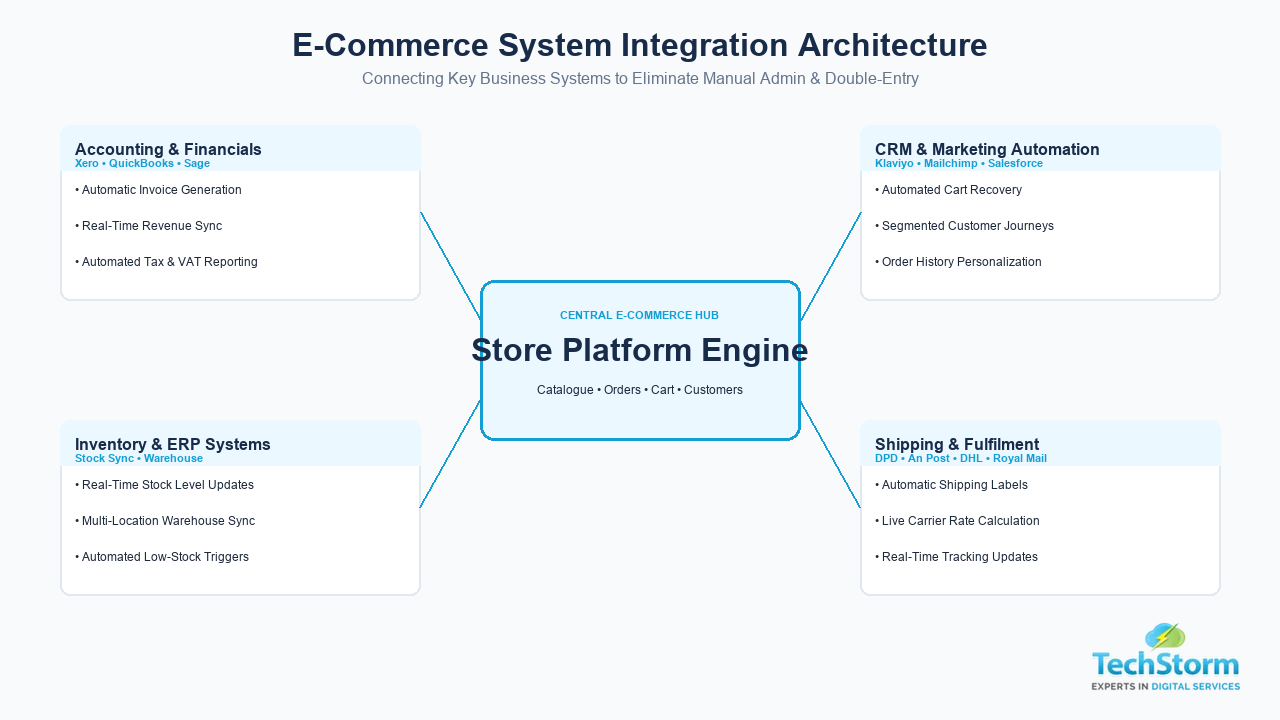
A store rarely runs on its own. Integration services connect the platform to the other systems a business already uses, so data does not have to be entered twice. The most common integrations are:
- Accounting software (Xero, QuickBooks, Sage) for automatic invoice and sales syncing.
- Inventory and warehouse management systems, so stock levels update in real time.
- CRM and email marketing platforms, so customer data flows into follow-up campaigns automatically.
- Shipping and fulfilment carriers, for automatic label generation and tracking updates.
- Payment gateways and fraud prevention tools.
Skipping integrations to save money upfront usually costs more later in manual admin time and stock errors, so it is worth budgeting for the two or three integrations that matter most to your operations from the start.
Multi-Channel E-Commerce Solutions: Selling Everywhere Your Customers Are
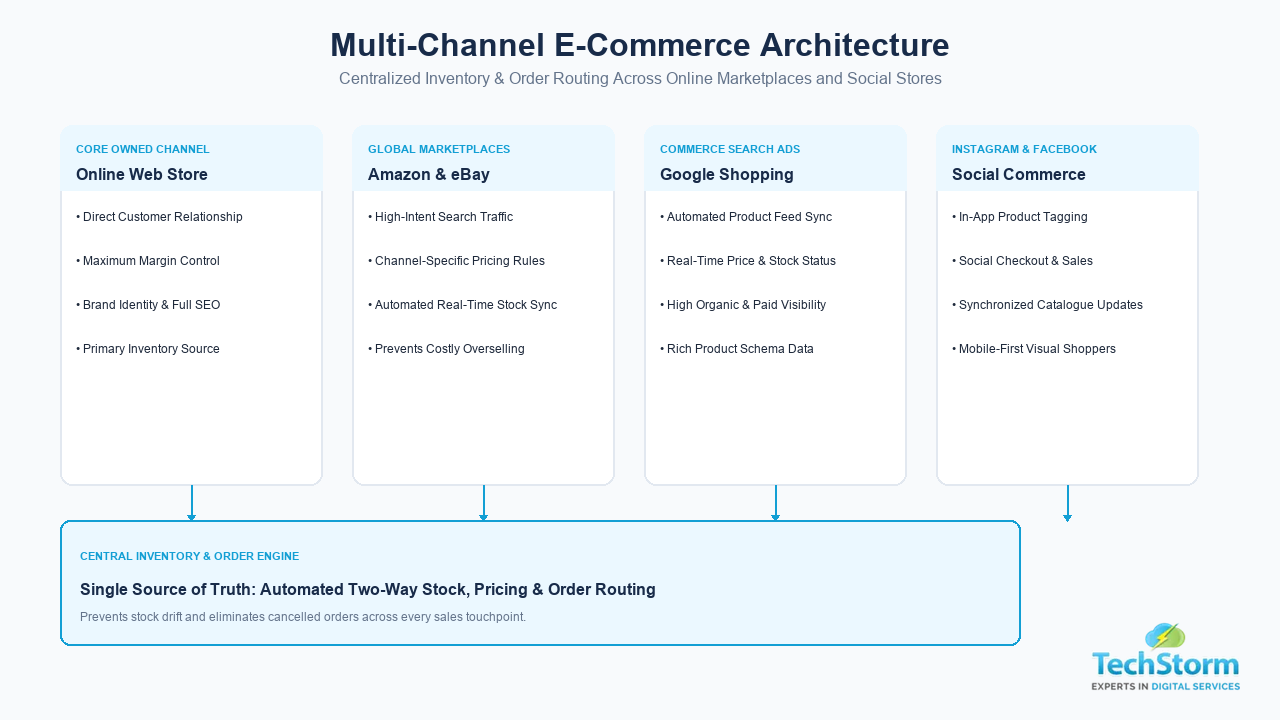
Multi-channel e-commerce means selling through your own website plus marketplaces and social platforms such as Amazon, eBay, Google Shopping, and Instagram or Facebook Shop, all from one managed inventory. Done well, this expands reach without extra manual work. Done poorly, it creates overselling, pricing mismatches, and customer service issues.
A working multi-channel setup needs:
- Centralized inventory management, so stock updates on every channel the moment an item sells anywhere.
- Consistent product data (titles, images, descriptions) formatted correctly for each channel's requirements.
- Automated order routing, so orders from every channel land in one place for fulfilment.
- Channel-specific pricing rules, since marketplace fees often mean margins need to be calculated differently per channel.
Step by Step: How a Platform Development or Migration Project Runs
- Audit and planning: review your current catalogue size, order volume, and the systems you already use before recommending a platform.
- Platform setup: core store configuration, theme or design implementation, and payment gateway setup.
- Integration build: connecting accounting, inventory, CRM, and shipping systems.
- Multi-channel connection: linking marketplaces and social selling channels to the central inventory.
- Testing: full order flow testing across every payment method and channel before launch.
- Launch and monitoring: go live with analytics and conversion tracking in place from day one, not added afterwards.
A Practical Example: Why Integration Order Matters
A pattern we see often: a business connects Amazon and Instagram Shop to their store before their inventory system is properly centralized. Within a few weeks, an item sells out on the website but still shows as available on Amazon, leading to a cancelled order and a customer service complaint. The fix is not more channels, it is sequencing: get one source of truth for inventory working correctly first, then add sales channels one at a time so each one can be tested against real stock data before it goes live. This is why we treat integration and multi-channel setup as a planned sequence rather than something to switch on all at once.
How to Choose an E-Commerce Development Partner
- Ask which platforms they have direct experience with, and ask to see live stores they have built on each.
- Ask how they handle inventory sync across multiple channels, and what happens if a sync fails.
- Ask whether SEO and page speed are part of the setup process or a separate add-on.
- Ask about post-launch support, since integrations need occasional maintenance as third-party platforms update their systems.
- Get a clear breakdown of setup cost versus ongoing costs (hosting, apps, transaction fees) before signing off.
Get Your Store Set Up to Sell on Every Channel
Whether you need a new platform built, an existing store optimized, integrations connected, or a multi-channel selling setup that actually keeps stock accurate, the sequencing in this guide is what determines whether it works smoothly or creates ongoing problems. Our website design services and e-commerce team can review your current setup and tell you exactly what order to tackle this in.