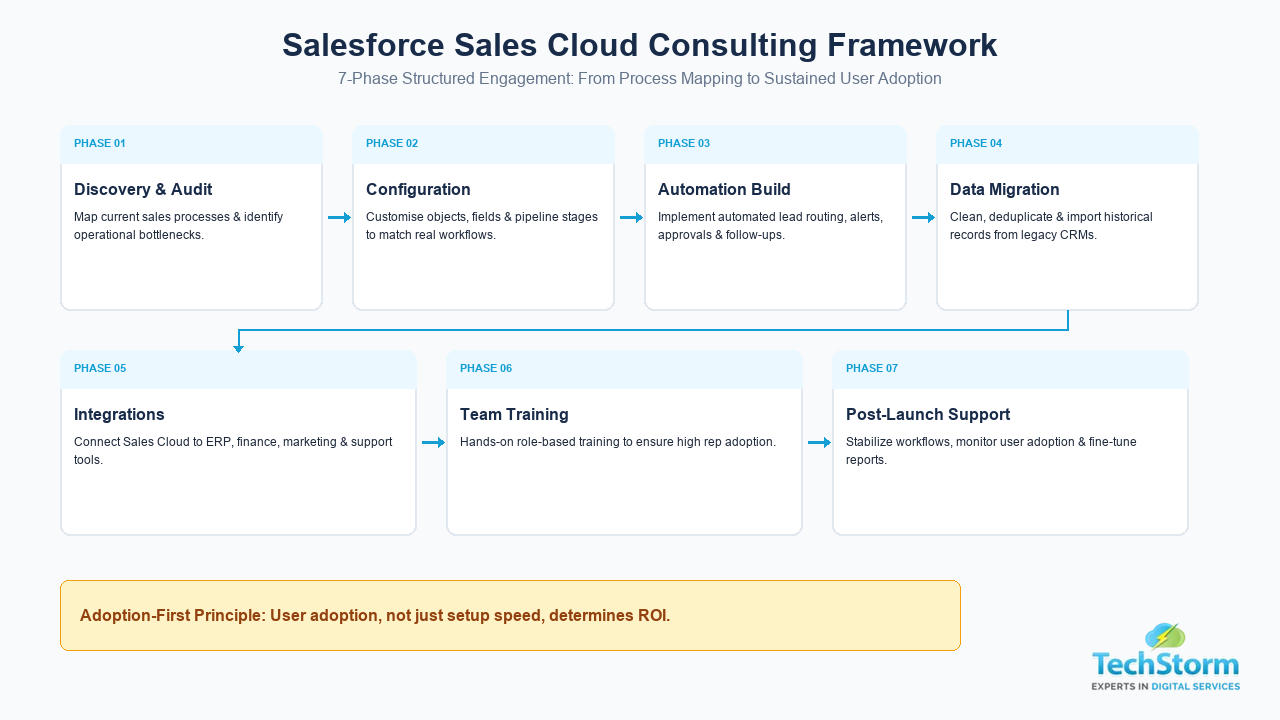
Executive Summary & Engagement Scope
- Core objective: Tailoring Salesforce CRM to how your reps actually sell, instead of forcing teams into rigid defaults.
- Typical timeline: 4 to 10 weeks for a single sales team rollout.
- Core engagement scope: Process mapping, configuration, historical data migration, two-way integrations, automated lead routing, and role-based rep training.
- Key ROI principle: User adoption, not just setup speed, determines whether a CRM investment delivers measurable revenue growth.
Salesforce Sales Cloud consulting is the process of configuring, customizing, and rolling out Salesforce's CRM platform so it matches how your sales team actually sells, rather than forcing your team to adapt to Salesforce's defaults. A good consulting engagement covers process mapping, configuration, data migration, integrations, automation, and user training, and it typically takes 4 to 10 weeks for a single sales team. If you are researching whether to bring in outside help for your Salesforce setup, this guide covers what the work involves, what tends to drive cost up or down, the steps a solid engagement follows, and what to check before you sign with a partner.
What is Salesforce Sales Cloud consulting?
Sales Cloud is Salesforce's core CRM product for managing leads, opportunities, accounts, and the sales pipeline. Out of the box, it is powerful but generic. Consulting is the work of turning that generic platform into a system that fits your sales process, your team's habits, and the other tools you already run (finance, marketing, support, e-commerce).
In practice, that means a consultant will typically:
- Map your current sales process and flag where it breaks down.
- Configure Sales Cloud objects, fields, and pipeline stages to match that process.
- Set up automation for lead routing, follow-ups, and approvals.
- Migrate historical data from spreadsheets or a legacy CRM.
- Connect Sales Cloud to other systems your business already uses.
- Build reports and dashboards leadership will actually look at.
- Train the sales team and manage the rollout so adoption sticks.
Our team offers dedicated Salesforce Sales Cloud consulting for businesses at every stage of this process, from a first-time setup to fixing a Salesforce instance that never got adopted properly.
Signs your business needs Sales Cloud consulting
Not every company needs outside help, but a few patterns tend to show up when internal setups hit a ceiling:
- Reps keep pipeline data in spreadsheets alongside Salesforce because the system does not match how they actually work.
- Leads sit unassigned for hours or days because routing rules do not exist or are unreliable.
- Sales and finance disagree on numbers because reports pull from different sources.
- Data from marketing campaigns never makes it cleanly into sales records.
- The team has stopped trusting dashboards, so decisions get made on gut feel instead.
- A previous implementation was rushed and adoption never recovered.
If two or more of these sound familiar, a scoped consulting engagement usually pays for itself within a couple of sales cycles through faster follow-up and cleaner forecasting.
What a Sales Cloud consulting engagement typically includes
A structured consulting project is divided into distinct, milestone-driven phases. The table below outlines what happens during each phase and the tangible deliverables produced.
| Phase | What happens | Typical output |
|---|---|---|
| Discovery | Interviews with sales, ops, and leadership to map the real process | Process map, requirements document |
| Configuration | Objects, fields, pipeline stages, and permissions set up in Salesforce | Working Sales Cloud instance |
| Automation | Flows and rules for lead routing, alerts, approvals, and follow-ups | Automated workflows |
| Data migration | Cleaning and importing data from spreadsheets or a legacy CRM | Migrated, validated dataset |
| Integrations | Connecting Sales Cloud to finance, marketing, or support tools | Two-way data sync |
| Training | Hands-on sessions and documentation for the sales team | Trained users, adoption plan |
| Support | Post-launch fixes and iteration as real usage surfaces gaps | Stabilized, adopted system |
Where a team's support or case-handling processes are just as messy as sales, it is common to scope Sales Cloud and Salesforce Service Cloud implementation together, since both share the same underlying data model and benefit from being planned at the same time.
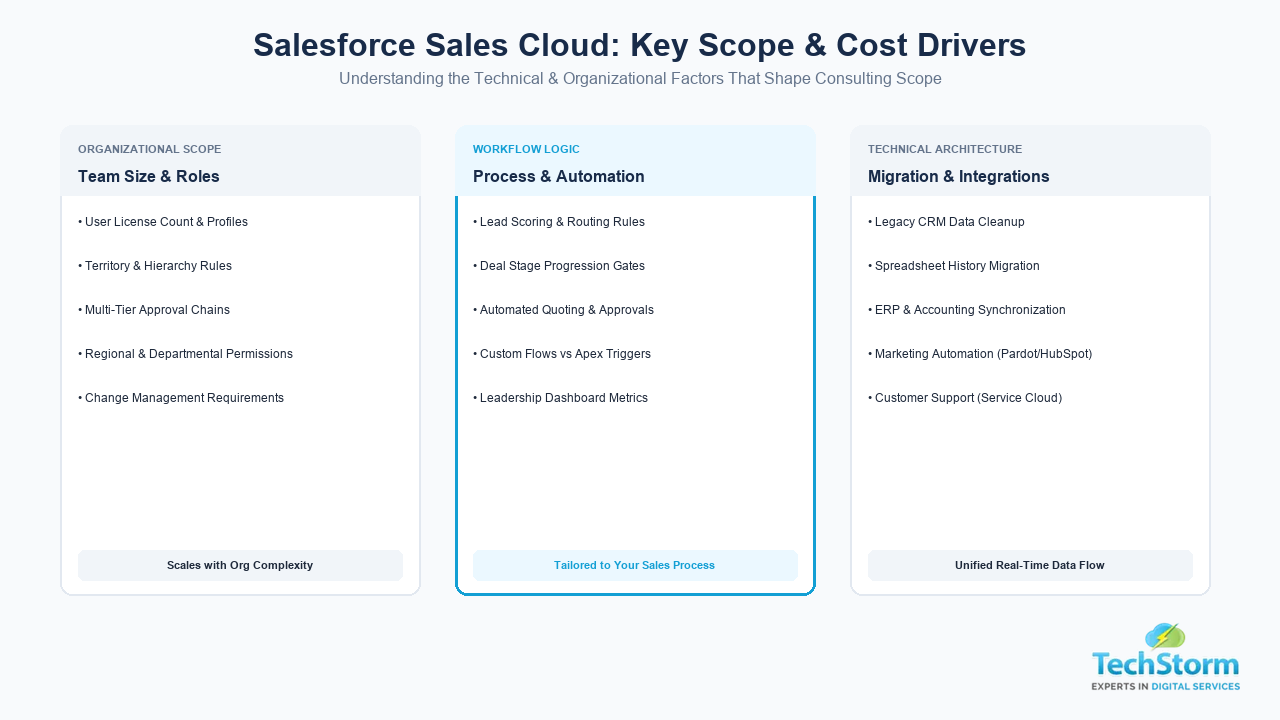
What drives the cost of Sales Cloud consulting
There is no single flat rate for this work, and any agency that quotes one without a discovery call is guessing. Cost is mainly driven by:
- Team size and license count: More users generally means more roles, permissions, and edge cases to configure.
- Process complexity: A simple, single-stage pipeline is cheap to set up. Multi-team approval chains, territory rules, and complex quoting are not.
- Data migration scope: Clean data from a modern CRM migrates quickly. Years of messy spreadsheet history takes longer to clean and validate.
- Number of integrations: Each connected system (accounting, marketing automation, support desk) adds scoping, build, and testing time.
- Custom automation and development: Standard flows and validation rules are relatively fast to build. Anything that needs custom code moves into Salesforce custom development territory and is priced separately.
- Training and change management: A rollout to 5 reps is a different job than a rollout to 200 reps across three regions.
Because of this, most experienced partners price by scope after a short discovery call rather than by a generic package. If you want a real number instead of a guess, that call is the fastest way to get one.
Step by step: how a Sales Cloud consulting project usually runs
- Discovery call: A short conversation to understand your team, your current setup, and your goals.
- Process and requirements review: The consultant maps your actual sales process and documents what the system needs to do.
- Solution design: A configuration and automation plan is proposed, along with a realistic timeline and cost.
- Build: Configuration, automation, and any custom development happen in a sandbox environment, not live.
- Data migration and testing: Historical data is cleaned, migrated, and validated before go-live.
- Training and go-live: The team is trained, documentation is handed over, and the system goes live.
- Post-launch support: Real usage always surfaces small gaps. A good partner stays on to fix these quickly.
How to choose a Sales Cloud consulting partner
A short checklist to run any shortlisted agency through before you sign:
- Do they ask about your sales process before talking about Salesforce features, or do they lead with the pitch?
- Can they show relevant experience with businesses of a similar size and complexity to yours?
- Do they explain pricing by scope, or push a one-size-fits-all package?
- Is training and documentation included, or treated as an afterthought?
- Do they offer post-launch support, or disappear after go-live?
- Can they handle related work such as Service Cloud or Marketing Cloud if you need it later, or will you need a second vendor?
Adoption, not the configuration itself, is usually what determines whether a Sales Cloud project succeeds. A partner who plans for training and change management from day one is a stronger long-term bet than one who only talks about setup speed.
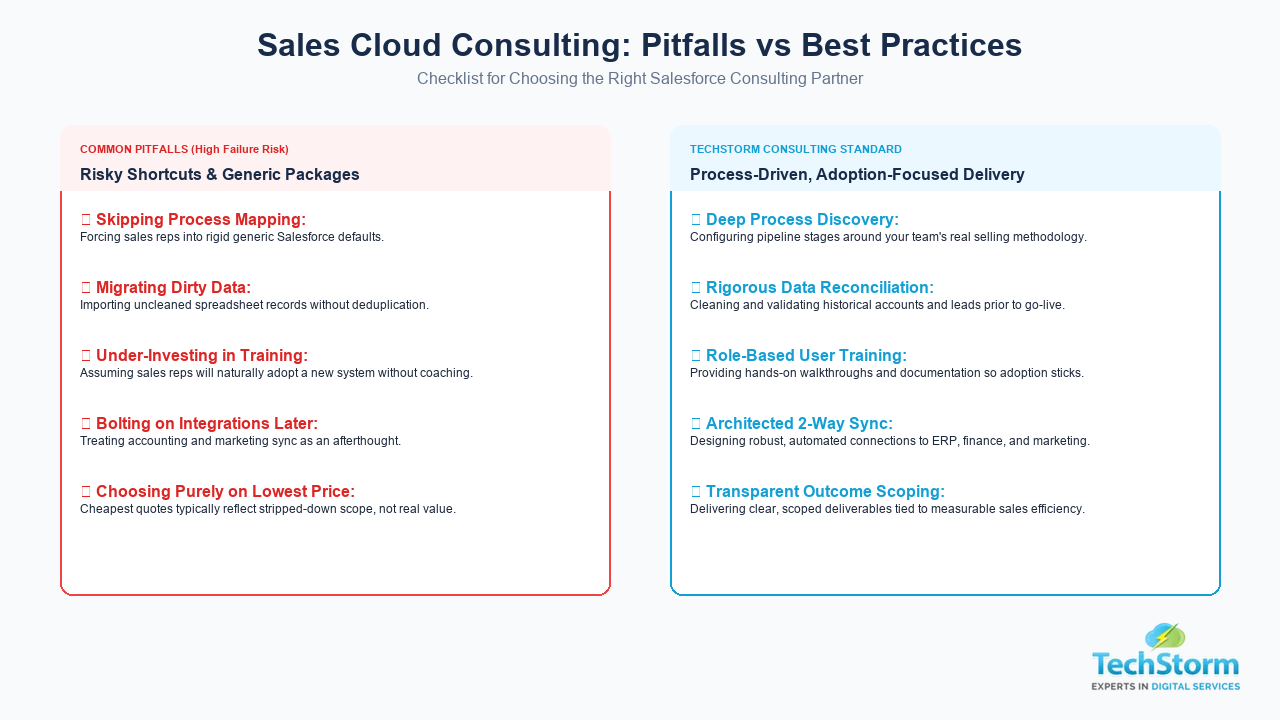
Common mistakes to avoid
- Skipping process mapping and going straight to configuration: This produces a system that matches Salesforce's defaults instead of your business.
- Migrating messy data without cleaning it first: Bad data in a new system is still bad data, just harder to fix later.
- Under-investing in training: A technically correct setup that reps do not use is a failed project.
- Treating integrations as an afterthought: Bolting on a connection to your marketing or finance tools after go-live usually costs more than planning for it upfront.
- Choosing a partner solely on price: The cheapest quote often reflects a narrower scope, not better value.
A typical scenario
To make this concrete: a mid-sized B2B services company with 15 sales reps often comes in running Salesforce in a mostly default state, with pipeline stages that do not match how deals actually move and no lead routing at all. A focused consulting engagement in a case like this usually starts by mapping the real sales stages, building automated lead assignment based on territory or industry, migrating a few years of spreadsheet history, and connecting the CRM to whatever quoting or accounting tool the finance team relies on. The result reps notice fastest is not the reporting, it is that leads stop sitting untouched for a day or two before anyone follows up. This is the kind of illustrative pattern, not a specific named client case, that shows up across most first-time Sales Cloud engagements of this size.
Book a Free Discovery Call with Our Salesforce Team
If your sales team is outgrowing spreadsheets, or your existing Salesforce setup never quite got adopted, the fastest way to get a real answer on scope and cost is a short conversation, not another generic guide. Book a free discovery call with our Salesforce consulting team and we will tell you honestly whether consulting, a lighter configuration fix, or something else entirely is the right next step for your business.